
Tasks
Maintenance- New 2
- In progress 2
- Waiting on customer 1
Overdue1
- Change the lock on the Al Narjis flat
For operations teams
Turn a customer’s message into a task with an owner and a date, then track it.
K Khalid Almutairi WhatsApp
Hello, the AC in flat 12 hasn’t been cooling since yesterday. When can the technician come? 9:12 AM
Create taskNew
Water leak in an Al Malqa flat’s kitchen
NNoura Alqahtani
In progress
Change the lock on the Al Narjis flat
FFahad Alsubaie
Done
Electrical check at the Al Yasmin villa
FFahad Alsubaie
Fix the AC in flat 12 NewIn progressDone
Companies and organizations that use Hatif every day







Today a request reaches you by phone or WhatsApp, and gets written on a scrap of paper or forwarded to a group chat. That’s when the chasing starts.
Everyone in the group assumes someone else took it.
Nobody knows when it has to be done, so it slips until the customer calls again.
To find out where it stands, you call and ask each person one by one.
When something goes wrong, you can’t tell who did what, or when.
Next day
Abu Faisal called, leak in the bathroom. Call him back
SundayCreate the task from the customer’s message or their contact record: what needs doing, who owns it, and by when. It stays linked to their conversation, so whoever opens it knows the story from the start.
K Khalid Almutairi WhatsApp
Hello, the AC in flat 12 hasn’t been cooling since yesterday. When can the technician come?9:12 AM
Fix the AC in flat 12
The AC hasn’t been cooling since yesterday. The customer is at the flat after mid-afternoon.
Change history2
Calls and WhatsApp messages land in the customer’s conversation, and you create the task from there without copying anything by hand.
Every task has an owner and a due date, so no request is left hanging with nobody on it.
Split it into steps, each with its own owner and date, and the team comments on it as they go.
Split the work into statuses you name yourself, and view it as a board or a calendar. At a glance you see what’s stuck, what’s overdue, and how much is on each day before you hand out anything new.
New2
Water leak in an Al Malqa flat’s kitchen
Noura Alqahtani
Request typePlumbing
Replace the parking lights at Al Rabi building
Fahad Alsubaie
Request typeElectrical
In progress2
Fix the AC in flat 12
Fahad Alsubaie
Request typeAC
Change the lock on the Al Narjis flat
Fahad Alsubaie
Request typeLocks
Waiting on customer1
Confirm the Al Yasmin villa inspection
Reem Aldosari
Request typeInspection
Sun4
1 tasks
Mon5
2 tasks
Tue6
1 tasks
Wed7
2 tasks
Thu8
1 tasks
No date
Renew the lift maintenance contract
Sara AlotaibiA list for each kind of work
Maintenance in one list, leases in another, each with its own statuses.
Fields from your own work
Add properties to tasks, such as request type or neighborhood, and filter by them.
Undated tasks don’t get lost
A task with no date waits beside the calendar until you give it a day.
Set the response time you want for your customers, such as a first reply within 10 minutes, and decide what happens when it runs late: an alert to the owner, then the conversation handed to a colleague. Hatif carries it out every time, with nobody watching.
The timer pauses after hours
Choose working hours only, and a message that arrives after closing doesn’t eat into the time all night.
After-hours requests become tasks
Anyone who messages on WhatsApp outside the team’s shifts gets a ready-made reply, and a follow-up task is created, due at the start of the next shift.
A report of every late reply
For every late reply you see the customer, who owned the conversation, and how late it was.
Every task keeps who created it, and who changed what and when. Every change to the account’s settings goes into the activity log under the name of whoever made it. When something goes wrong, you find the answer without asking the team one by one.
| Who | What changed | When |
|---|---|---|
| NNoura Alqahtani | AutomationsUpdated the “Alert on a late reply” automation | 6 Oct, 9:12 AM |
| Changed fields
| ||
| SSara Alotaibi | PermissionsGave Noura Alqahtani the team supervisor role | 5 Oct, 4:40 PM |
| FFahad Alsubaie | ChannelsAdded Reem Aldosari to the WhatsApp Business channel | 5 Oct, 11:05 AM |
| SSara Alotaibi | TeamInvited Mohammed Alharbi to the workspace | 4 Oct, 10:30 AM |
Handovers on the record
When a conversation changes owner, it records who changed it and when.
Everyone sees what’s theirs
Group permissions into a role named after the job, and set the channels and conversations it can reach.
Presence, hour by hour
See who is online now, and when each team member was available over the last seven days.
Technicians and reps install the Hatif app on their phones, see their tasks and conversations, and answer customers from the company number. Everything they do shows up for the rest of the team.
9:41
Dar Al Marasi Real Estate
Assigned to me
I used to get a number and a phone for every employee. Since Hatif, I haven’t needed new numbers or SIMs.
 Abdulrahman Alomran Founder and CEO, Rekaz
Open tasks and overdue ones, replies that ran past their target, missed calls, and who on your team is online now. All of it in front of you in Hatif.
Overdue1
Past target36 of 458
Breach rate7.9%
On timePast target
Answered1,078
Missed115
AnsweredMissed
The figures in this panel come from a demo workspace.
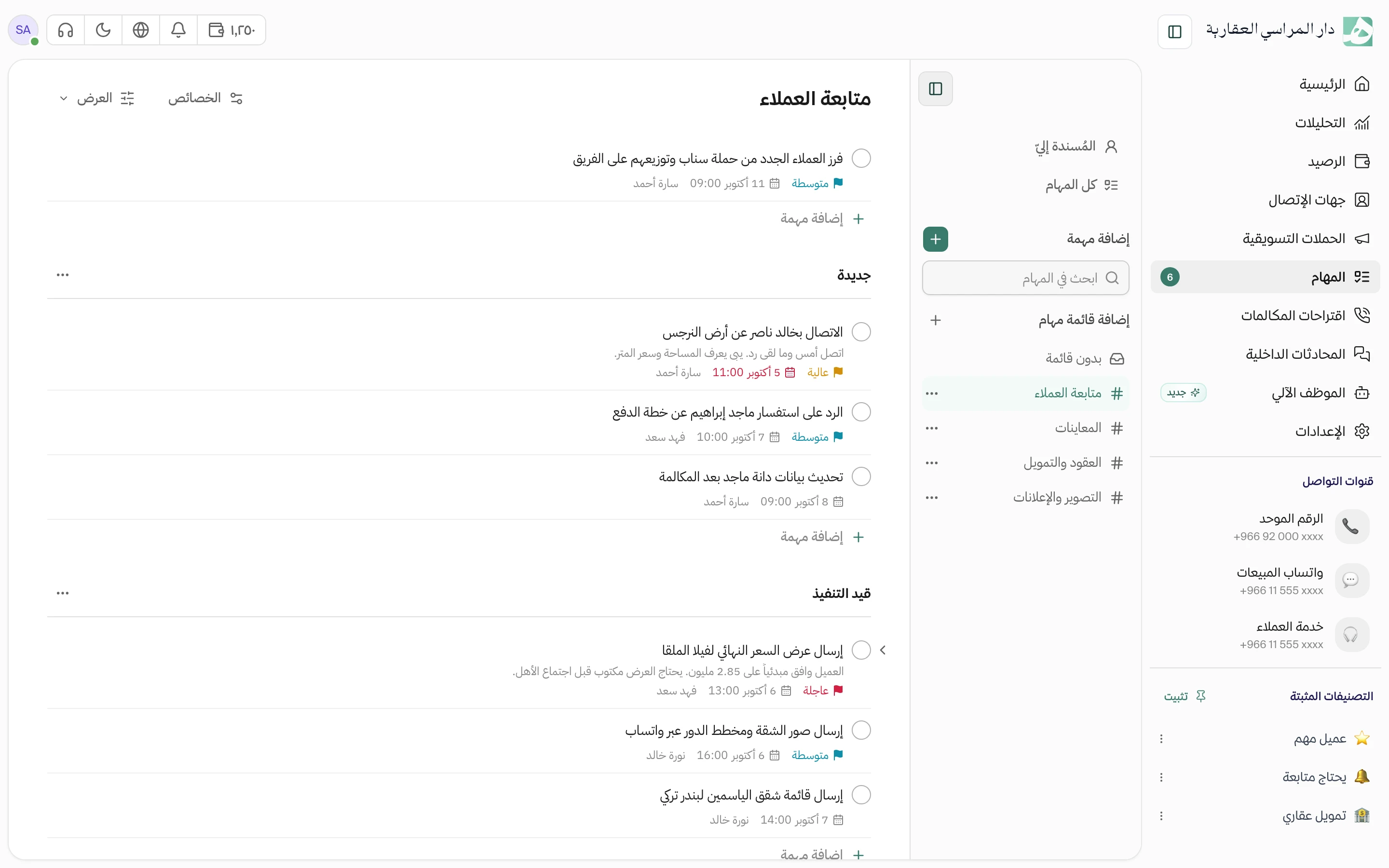
Every follow-up written down, with an owner, a date and a status
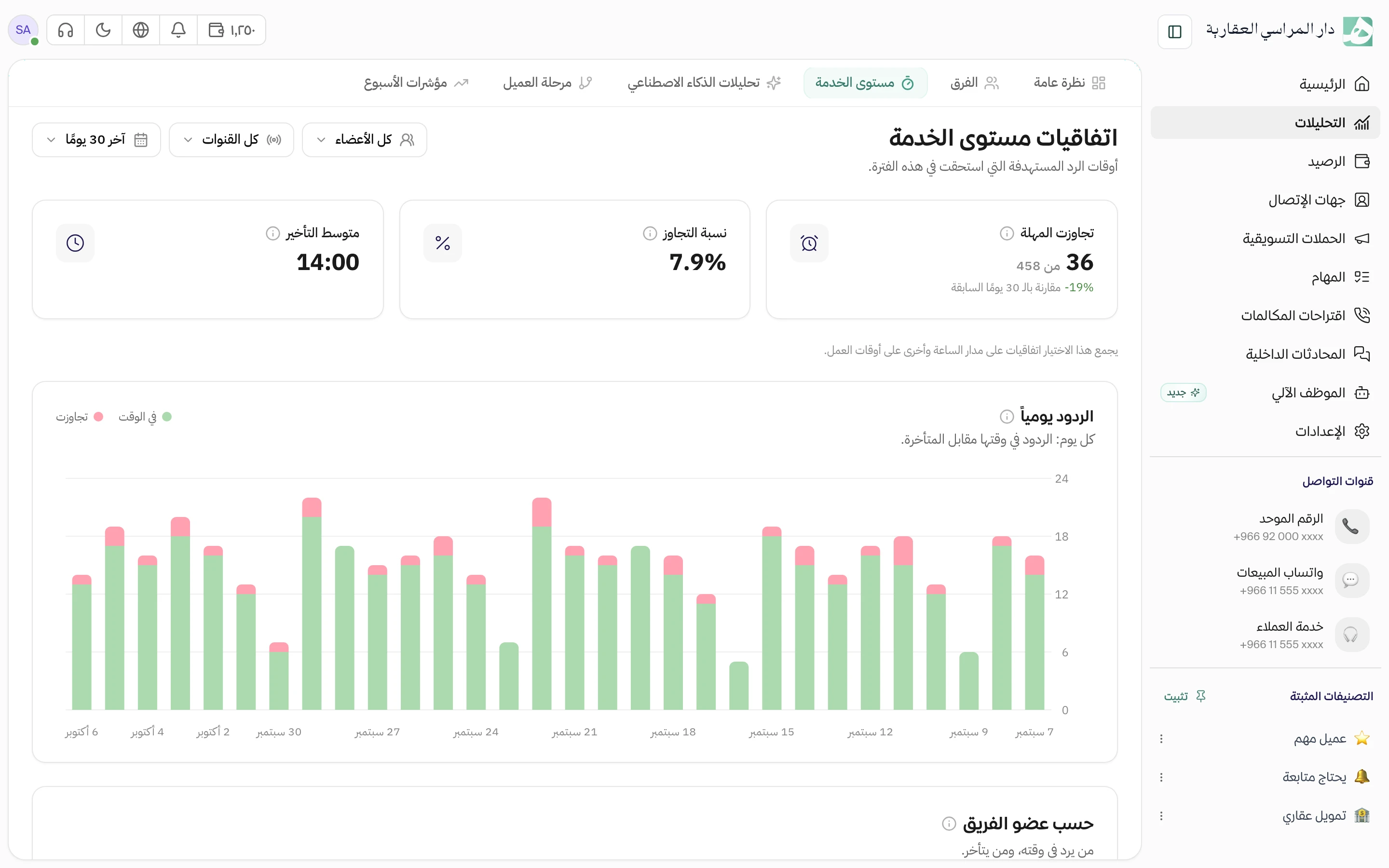
A set reply time for every conversation, and a report on what ran late
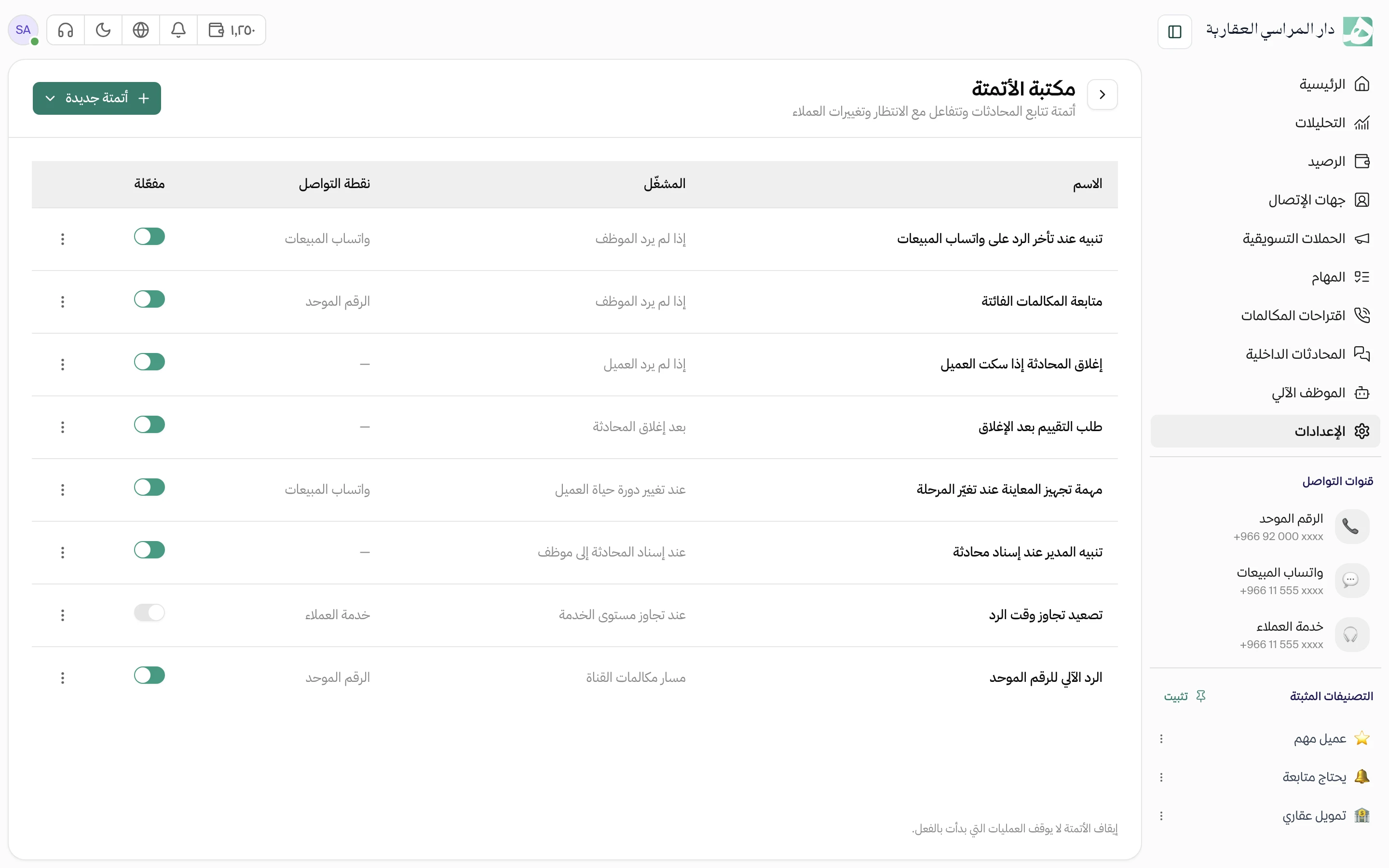
Rules that watch conversations and act when a reply runs late
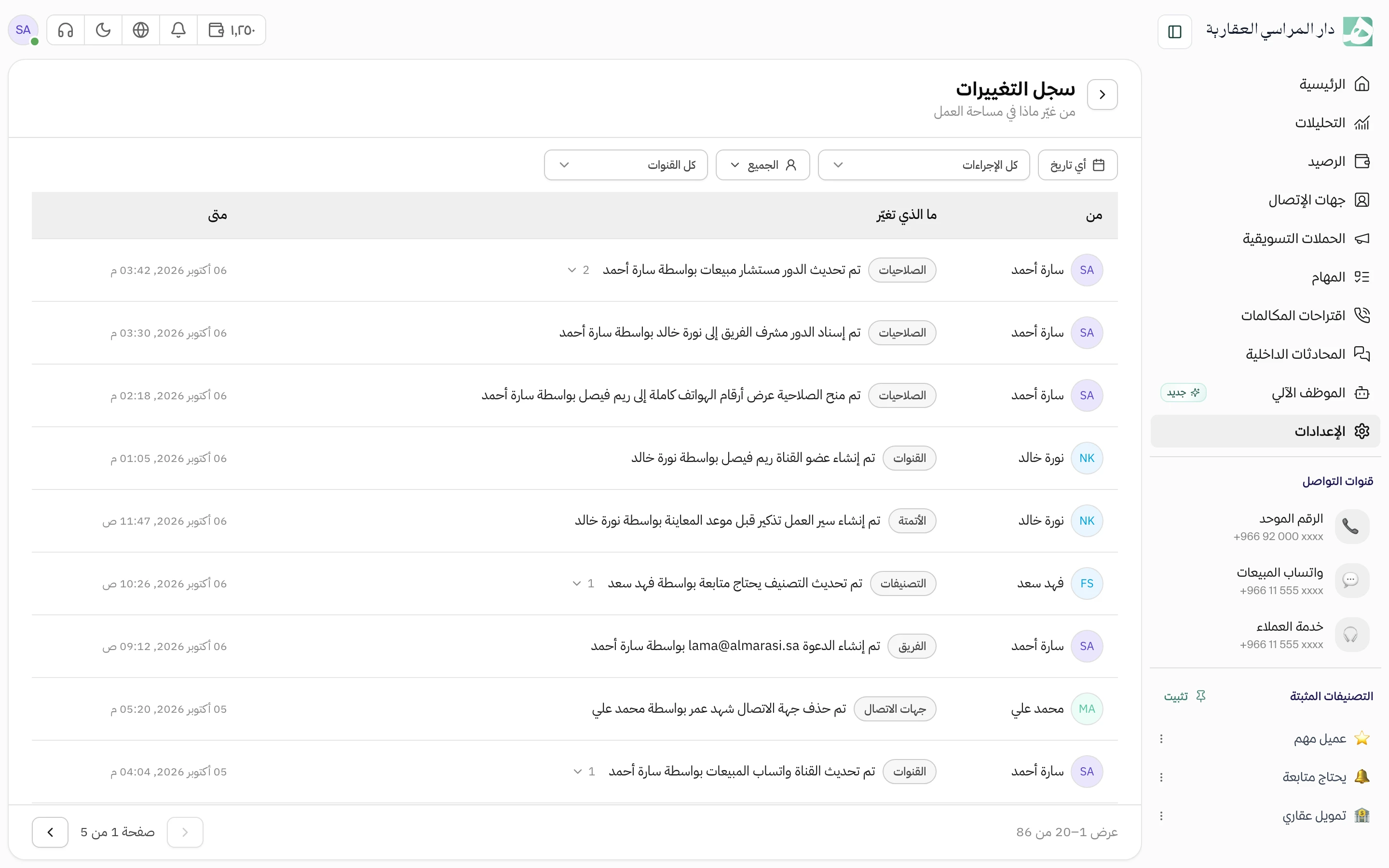
See who changed what in your account and when, and who is online now
Before you start with your team, these are the questions that matter for operations work.
Yes, from the message itself. The task is saved linked to the conversation and the customer, and whoever opens it later can get to the conversation from it.
You decide for each task. A private task is seen by whoever created it, its owner, and anyone with permission to view all tasks. A team task is seen by every member.
If you turn on shifts for your team, anyone who messages on WhatsApp outside them gets a ready-made reply, and a follow-up task is created automatically, due at the start of the next shift.
You choose when you remove them: leave them unassigned, share them evenly across the team, or assign them to another member you pick.
Sign up and use Hatif for free. Setup is done the same day.
Fahad Alsubaie6 Oct, 12:40 PM
The technician needs a spare part, so the visit is tomorrow afternoon.